 优医问诊H5
药品订单
药品订单-支付页面
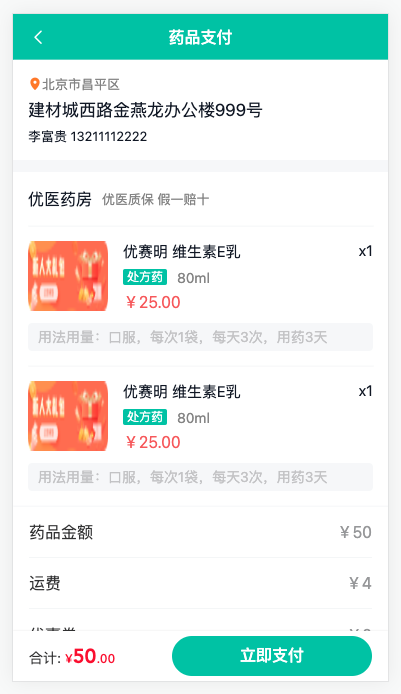
1)路由与组件
ts
    {
      path: '/order/pay',
      component: () => import('@/views/Order/OrderPay.vue'),
      meta: { title: '药品支付' }
    },
1
2
3
4
5
2
3
4
5
vue
<script setup lang="ts"></script>

<template>
  <div class="order-pay-page">
    <cp-nav-bar title="药品支付" />
    <div class="order-address">
      <p class="area">
        <van-icon name="location" />
        <span>北京市昌平区</span>
      </p>
      <p class="detail">建材城西路金燕龙办公楼999号</p>
      <p>李富贵 13211112222</p>
    </div>
    <div class="order-medical">
      <div class="head">
        <h3>优医药房</h3>
        <small>优医质保 假一赔十</small>
      </div>
      <div class="item van-hairline--top" v-for="i in 2" :key="i">
        <img class="img" src="@/assets/ad.png" alt="" />
        <div class="info">
          <p class="name">
            <span>优赛明 维生素E乳</span>
            <span>x1</span>
          </p>
          <p class="size">
            <van-tag>处方药</van-tag>
            <span>80ml</span>
          </p>
          <p class="price">¥25.00</p>
        </div>
        <div class="desc">用法用量:口服,每次1袋,每天3次,用药3天</div>
      </div>
    </div>
    <div class="order-detail">
      <van-cell-group>
        <van-cell title="药品金额" value="¥50" />
        <van-cell title="运费" value="¥4" />
        <van-cell title="优惠券" value="-¥0" />
        <van-cell title="实付款" value="¥54" class="price" />
      </van-cell-group>
    </div>
    <div class="order-tip">
      <p class="tip">
        由于药品的特殊性,如非错发、漏发药品的情况,药品一经发出
        不得退换,请核对药品信息无误后下单。
      </p>
      <van-checkbox>我已同意<a href="javascript:;">支付协议</a></van-checkbox>
    </div>
    <van-submit-bar
      :price="50 * 100"
      button-text="立即支付"
      button-type="primary"
      text-align="left"
    ></van-submit-bar>
  </div>
</template>

<style lang="scss" scoped>
:deep(.van-nav-bar) {
  background-color: var(--cp-primary);
  .van-nav-bar__arrow,
  .van-nav-bar__title {
    color: #fff;
  }
}
:deep(.van-cell) {
  .van-cell__title {
    font-size: 16px;
  }
  .van-cell__value {
    font-size: 16px;
  }
  &.price {
    .van-cell__value {
      font-size: 18px;
      color: var(--cp-price);
    }
  }
}
:deep(.van-submit-bar) {
  box-shadow: 0 0 2px rgba(0, 0, 0, 0.1);
  .van-button {
    width: 200px;
  }
}
.order-pay-page {
  padding: 46px 0 65px;
}
.order-address {
  padding: 15px 15px 0 15px;
  background-color: #fff;
  font-size: 13px;
  .area {
    color: var(--cp-tag);
    margin-bottom: 5px;
    .van-icon-location {
      color: #ff7702;
      font-size: 14px;
    }
  }
  .detail {
    font-size: 17px;
    margin-bottom: 5px;
  }
  &::after {
    content: '';
    display: block;
    height: 12px;
    background-color: var(--cp-bg);
    margin: 0 -15px;
    margin-top: 15px;
  }
}

.order-medical {
  background-color: #fff;
  padding: 0 15px;
  .head {
    display: flex;
    height: 54px;
    align-items: center;
    > h3 {
      font-size: 16px;
      font-weight: normal;
    }
    > small {
      font-size: 13px;
      color: var(--cp-tag);
      margin-left: 10px;
    }
  }
  .item {
    display: flex;
    flex-wrap: wrap;
    padding: 15px 0;
    .img {
      width: 80px;
      height: 70px;
      border-radius: 2px;
      overflow: hidden;
    }
    .info {
      padding-left: 15px;
      width: 250px;
      .name {
        display: flex;
        font-size: 15px;
        margin-bottom: 5px;
        > span:first-child {
          width: 200px;
        }
        > span:last-child {
          width: 50px;
          text-align: right;
        }
      }
      .size {
        margin-bottom: 5px;
        .van-tag {
          background-color: var(--cp-primary);
          vertical-align: middle;
        }
        span:not(.van-tag) {
          margin-left: 10px;
          color: var(--cp-tag);
          vertical-align: middle;
        }
      }
      .price {
        font-size: 16px;
        color: #eb5757;
      }
    }
    .desc {
      width: 100%;
      background-color: var(--cp-bg);
      border-radius: 4px;
      margin-top: 10px;
      padding: 4px 10px;
      color: var(--cp-tip);
    }
  }
}
.order-tip {
  padding: 0 15px;
  display: flex;
  flex-wrap: wrap;
  justify-content: center;
  margin-top: 10px;
  .tip {
    font-size: 12px;
    color: var(--cp-tag);
    width: 100%;
    &::before {
      content: '*';
      color: var(--cp-price);
      font-size: 14px;
    }
    margin-bottom: 30px;
  }
  .van-checkbox {
    a {
      color: var(--cp-primary);
    }
  }
}
</style>
1
2
3
4
5
6
7
8
9
10
11
12
13
14
15
16
17
18
19
20
21
22
23
24
25
26
27
28
29
30
31
32
33
34
35
36
37
38
39
40
41
42
43
44
45
46
47
48
49
50
51
52
53
54
55
56
57
58
59
60
61
62
63
64
65
66
67
68
69
70
71
72
73
74
75
76
77
78
79
80
81
82
83
84
85
86
87
88
89
90
91
92
93
94
95
96
97
98
99
100
101
102
103
104
105
106
107
108
109
110
111
112
113
114
115
116
117
118
119
120
121
122
123
124
125
126
127
128
129
130
131
132
133
134
135
136
137
138
139
140
141
142
143
144
145
146
147
148
149
150
151
152
153
154
155
156
157
158
159
160
161
162
163
164
165
166
167
168
169
170
171
172
173
174
175
176
177
178
179
180
181
182
183
184
185
186
187
188
189
190
191
192
193
194
195
196
197
198
199
200
201
202
203
204
205
206
207
208
2
3
4
5
6
7
8
9
10
11
12
13
14
15
16
17
18
19
20
21
22
23
24
25
26
27
28
29
30
31
32
33
34
35
36
37
38
39
40
41
42
43
44
45
46
47
48
49
50
51
52
53
54
55
56
57
58
59
60
61
62
63
64
65
66
67
68
69
70
71
72
73
74
75
76
77
78
79
80
81
82
83
84
85
86
87
88
89
90
91
92
93
94
95
96
97
98
99
100
101
102
103
104
105
106
107
108
109
110
111
112
113
114
115
116
117
118
119
120
121
122
123
124
125
126
127
128
129
130
131
132
133
134
135
136
137
138
139
140
141
142
143
144
145
146
147
148
149
150
151
152
153
154
155
156
157
158
159
160
161
162
163
164
165
166
167
168
169
170
171
172
173
174
175
176
177
178
179
180
181
182
183
184
185
186
187
188
189
190
191
192
193
194
195
196
197
198
199
200
201
202
203
204
205
206
207
208
2)API函数和渲染 types/order.d.ts
ts
import type { Medical } from './room'

export type OrderPre = {
  // 处方ID
  id: string
  // 优惠券ID
  couponId: string
  // 积分抵扣
  pointDeduction: number
  // 优惠券抵扣
  couponDeduction: number
  // 应付款
  payment: number
  // 邮费
  expressFee: number
  // 实付款
  actualPayment: number
  // 药品订单
  medicines: Medical[]
}
export type Address = {
  // 地址ID
  id: string
  // 联系方式
  mobile: string
  // 收件人
  receiver: string
  // 省
  province: string
  // 市
  city: string
  // 区
  county: string
  // 详细地址
  addressDetail: string
}

// 订单列表
export type AddressItem = Address & {
  // 是否默认地址,0 不是 1 是
  isDefault: 0 | 1
  // 邮政编码
  postalCode: string
}
1
2
3
4
5
6
7
8
9
10
11
12
13
14
15
16
17
18
19
20
21
22
23
24
25
26
27
28
29
30
31
32
33
34
35
36
37
38
39
40
41
42
43
44
2
3
4
5
6
7
8
9
10
11
12
13
14
15
16
17
18
19
20
21
22
23
24
25
26
27
28
29
30
31
32
33
34
35
36
37
38
39
40
41
42
43
44
services/order.ts
ts
import type { OrderPre,AddressItem } from '@/types/order'
import { request } from '@/utils/request'

// 查询药品订单预支付信息
export const getMedicalOrderPre = (params: { prescriptionId: string }) =>
  request<OrderPre>('/patient/medicine/order/pre', 'GET', params)

  // 获取收货地址列表
export const getAddressList = () => request<AddressItem[]>('/patient/order/address')
1
2
3
4
5
6
7
8
9
2
3
4
5
6
7
8
9
vue
<script setup lang="ts">
import { getAddressList, getMedicalOrderPre } from '@/services/order'
import type { AddressItem, OrderPre } from '@/types/order'
import { onMounted, ref } from 'vue'
import { useRoute } from 'vue-router'

const route = useRoute()
const orderPre = ref<OrderPre>()
const address = ref<AddressItem>()
onMounted(async () => {
  const res = await getMedicalOrderPre({ prescriptionId: route.query.id as string })
  const addRes = await getAddressList()
  orderPre.value = res.data
  // 设置收货地址
  if (addRes.data.length) {
    const defAddress = addRes.data.find((item) => item.isDefault === 0)
    if (defAddress) address.value = defAddress
    else address.value = addRes.data[0]
  }
})
</script>

<template>
  <div class="order-pay-page" v-if="orderPre && address">
    <cp-nav-bar title="药品支付" />
    <div class="order-address">
      <p class="area">
        <van-icon name="location" />
        <span>{{ address.province + address.city + address.county }}</span>
      </p>
      <p class="detail">{{ address.addressDetail }}</p>
      <p>
        {{ address.receiver }}
        {{ address.mobile.replace(/^(\d{3})(?:\d{4})(\d{4})$/, '\$1****\$2') }}
      </p>
    </div>
    <div class="order-medical">
      <div class="head">
        <h3>优医药房</h3>
        <small>优医质保 假一赔十</small>
      </div>
      <div class="item van-hairline--top" v-for="med in orderPre.medicines" :key="med.id">
        <img class="img" :src="med.avatar" alt="" />
        <div class="info">
          <p class="name">
            <span>{{ med.name }}</span>
            <span>x{{ med.quantity }}</span>
          </p>
          <p class="size">
            <van-tag v-if="med.prescriptionFlag === 1">处方药</van-tag>
            <span>{{ med.specs }}</span>
          </p>
          <p class="price">¥{{ med.amount }}</p>
        </div>
        <div class="desc">{{ med.usageDosag }}</div>
      </div>
    </div>
    <div class="order-detail">
      <van-cell-group>
        <van-cell title="药品金额" :value="`¥${orderPre.payment}`" />
        <van-cell title="运费" :value="`¥${orderPre.expressFee}`" />
        <van-cell title="优惠券" :value="`-¥${orderPre.couponDeduction}`" />
        <van-cell title="实付款" :value="`¥${orderPre.actualPayment}`" class="price" />
      </van-cell-group>
    </div>
    <div class="order-tip">
      <p class="tip">
        由于药品的特殊性,如非错发、漏发药品的情况,药品一经发出
        不得退换,请核对药品信息无误后下单。
      </p>
      <van-checkbox>我已同意<a href="javascript:;">支付协议</a></van-checkbox>
    </div>
    <van-submit-bar
      :price="orderPre.actualPayment * 100"
      button-text="立即支付"
      button-type="primary"
      text-align="left"
    ></van-submit-bar>
  </div>
  <div class="order-pay-page" v-else>
    <cp-nav-bar title="药品支付" />
    <van-skeleton title :row="4" style="margin-top: 30px" />
    <van-skeleton title :row="4" style="margin-top: 30px" />
  </div>
</template>
1
2
3
4
5
6
7
8
9
10
11
12
13
14
15
16
17
18
19
20
21
22
23
24
25
26
27
28
29
30
31
32
33
34
35
36
37
38
39
40
41
42
43
44
45
46
47
48
49
50
51
52
53
54
55
56
57
58
59
60
61
62
63
64
65
66
67
68
69
70
71
72
73
74
75
76
77
78
79
80
81
82
83
84
85
2
3
4
5
6
7
8
9
10
11
12
13
14
15
16
17
18
19
20
21
22
23
24
25
26
27
28
29
30
31
32
33
34
35
36
37
38
39
40
41
42
43
44
45
46
47
48
49
50
51
52
53
54
55
56
57
58
59
60
61
62
63
64
65
66
67
68
69
70
71
72
73
74
75
76
77
78
79
80
81
82
83
84
85
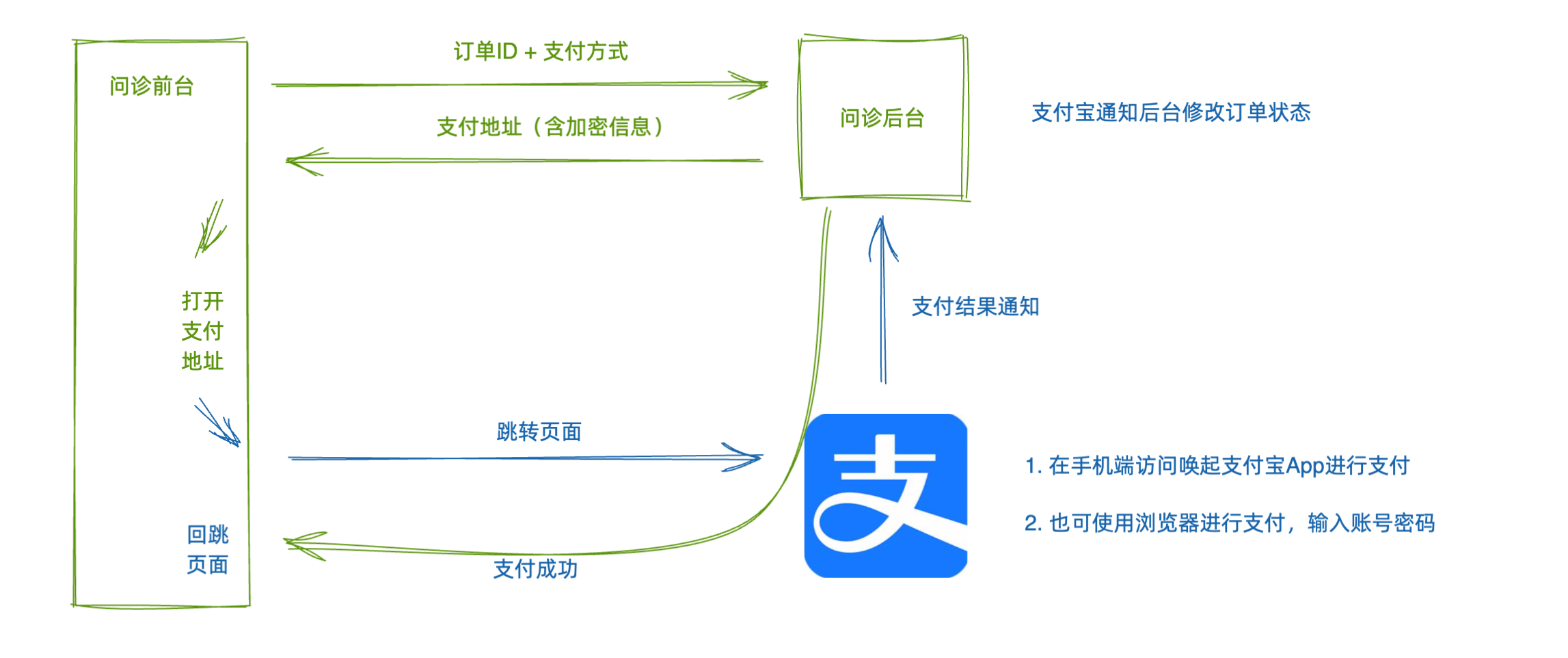
药品订单-进行支付
1)生成药品订单API函数
ts
// 创建药品订单
export const createMedicalOrder = (data: { id: string; addressId: string; couponId?: string }) =>
  request<{ id: string }>('/patient/medicine/order', 'POST', data)
1
2
3
2
3
2)支付抽屉支持,设置回跳地址
diff
const { orderId, show, payCallback } = defineProps<{
  orderId: string
  actualPayment: number
  onClose?: () => void
  show: boolean
+  payCallback: string
}>()
1
2
3
4
5
6
7
2
3
4
5
6
7
diff
// 跳转支付
const pay = async () => {
  if (paymentMethod.value === undefined) return Toast('请选择支付方式')
  Toast.loading('跳转支付')
  const res = await getConsultOrderPayUrl({
    orderId: orderId,
    paymentMethod: paymentMethod.value,
+    payCallback
  })
  window.location.href = res.data.payUrl
}
1
2
3
4
5
6
7
8
9
10
11
2
3
4
5
6
7
8
9
10
11
- 生成订单,使用支付抽屉组件
ts
import { createMedicalOrder } from '@/services/order'
1
ts
// 生成订单
const agree = ref(false)
const loading = ref(false)
const orderId = ref('')
const submit = async () => {
  if (!agree.value) return Toast('请同意支付协议')
  if (!address.value?.id) return Toast('请选择收货地址')
  if (!orderPre.value?.id) return Toast('未找到处方')
  // 没有生成订单ID
  if (!orderId.value) {
    loading.value = true
    try {
      const res = await createMedicalOrder({
        id: orderPre.value?.id,
        addressId: address.value?.id,
        couponId: orderPre.value.couponId
      })
      orderId.value = res.data.id
      loading.value = false
      // 打开支付抽屉
      show.value = true
    } catch (e) {
      loading.value = false
    }
  } else {
    show.value = true
  }
}
// 控制抽屉和弹窗
const show = ref(false)
1
2
3
4
5
6
7
8
9
10
11
12
13
14
15
16
17
18
19
20
21
22
23
24
25
26
27
28
29
30
2
3
4
5
6
7
8
9
10
11
12
13
14
15
16
17
18
19
20
21
22
23
24
25
26
27
28
29
30
html
    <cp-pay-sheet
      :orderId="orderId"
      :actualPayment="orderPre.actualPayment"
      payCallback="http://localhost/order/pay/result"
      v-model:show="show"
    />
1
2
3
4
5
6
2
3
4
5
6
:::warn payCallback 的域名+端口号,和自己的开发服务启动的地址和端口号一致。 :::
药品订单-支付结果
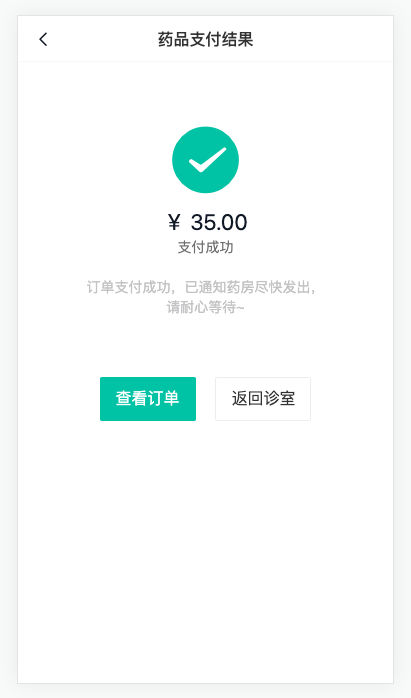
1)路由与组件
ts
    {
      path: '/order/pay/result',
      component: () => import('@/views/Order/OrderPayResult.vue'),
      meta: { title: '药品支付结果' }
    }
1
2
3
4
5
2
3
4
5
vue
<script setup lang="ts"></script>

<template>
  <div class="order-pay-result-page">
    <cp-nav-bar title="药品支付结果" />
    <div class="result">
      <van-icon name="checked" />
      <p class="price">¥ 35.00</p>
      <p class="status">支付成功</p>
      <p class="tip">订单支付成功,已通知药房尽快发出, 请耐心等待~</p>
      <div class="btn">
        <van-button type="primary">查看订单</van-button>
        <van-button>返回诊室</van-button>
      </div>
    </div>
  </div>
</template>

<style lang="scss" scoped>
.order-pay-result-page {
  padding-top: 46px;
}
.result {
  display: flex;
  flex-direction: column;
  align-items: center;
  .van-icon {
    font-size: 75px;
    color: var(--cp-primary);
    margin-top: 60px;
  }
  .price {
    font-size: 22px;
    margin-top: 10px;
  }
  .status {
    color: var(--cp-text3);
  }
  .tip {
    color: var(--cp-tip);
    width: 240px;
    text-align: center;
    margin-top: 20px;
  }
  .btn {
    margin-top: 60px;
    .van-button--primary {
      margin-right: 20px;
    }
  }
  &.error {
    .van-icon {
      color: var(--cp-price);
    }
  }
}
</style>
1
2
3
4
5
6
7
8
9
10
11
12
13
14
15
16
17
18
19
20
21
22
23
24
25
26
27
28
29
30
31
32
33
34
35
36
37
38
39
40
41
42
43
44
45
46
47
48
49
50
51
52
53
54
55
56
57
2
3
4
5
6
7
8
9
10
11
12
13
14
15
16
17
18
19
20
21
22
23
24
25
26
27
28
29
30
31
32
33
34
35
36
37
38
39
40
41
42
43
44
45
46
47
48
49
50
51
52
53
54
55
56
57
2)展示信息
ts
export type OrderDetail = {
  id: string
  orderNo: string
  type: 4
  createTime: string
  prescriptionId: string
  status: OrderType
  statusValue: string
  medicines: Medical[]
  countDown: number
  addressInfo: Address
  expressInfo: {
    content: string
    time: string
  }
  payTime: string
  paymentMethod?: 0 | 1
  payment: number
  pointDeduction: number
  couponDeduction: number
  payment: number
  expressFee: number
  actualPayment: number
  roomId: string
}
1
2
3
4
5
6
7
8
9
10
11
12
13
14
15
16
17
18
19
20
21
22
23
24
25
2
3
4
5
6
7
8
9
10
11
12
13
14
15
16
17
18
19
20
21
22
23
24
25
ts
// 获取药品订单详情
export const getMedicalOrderDetail = (id: string) =>
  request<OrderDetail>(`/patient/medicine/order/detail/${id}`)
1
2
3
2
3
vue
<script setup lang="ts">
import { OrderType } from '@/enums'
import { getMedicalOrderDetail } from '@/services/order'
import type { OrderDetail } from '@/types/order'
import { onMounted, ref } from 'vue'
import { useRoute } from 'vue-router'

const order = ref<OrderDetail>()
const route = useRoute()
onMounted(async () => {
  const res = await getMedicalOrderDetail(route.query.orderId as string)
  order.value = res.data
})
</script>

<template>
  <div class="order-pay-result-page">
    <cp-nav-bar title="药品支付结果" />
    <div class="result error" v-if="order?.status === OrderType.ConsultPay">
      <van-icon name="clear" />
      <p class="price">¥ {{ order?.actualPayment }}</p>
      <p class="status">支付失败</p>
      <p class="tip">订单支付失败,可以点击查看订单继续支付,如有疑问联系客服~</p>
      <div class="btn">
        <van-button type="primary" :to="`/order/${order?.id}`">查看订单</van-button>
        <van-button :to="`/room?orderId=${order?.roomId}`">返回诊室</van-button>
      </div>
    </div>
    <div class="result" v-else>
      <van-icon name="checked" />
      <p class="price">¥ {{ order?.actualPayment }}</p>
      <p class="status">支付成功</p>
      <p class="tip">订单支付成功,已通知药房尽快发出, 请耐心等待~</p>
      <div class="btn">
        <van-button type="primary" :to="`/order/${order?.id}`">查看订单</van-button>
        <van-button :to="`/room?orderId=${order?.roomId}`">返回诊室</van-button>
      </div>
    </div>
  </div>
</template>
1
2
3
4
5
6
7
8
9
10
11
12
13
14
15
16
17
18
19
20
21
22
23
24
25
26
27
28
29
30
31
32
33
34
35
36
37
38
39
40
2
3
4
5
6
7
8
9
10
11
12
13
14
15
16
17
18
19
20
21
22
23
24
25
26
27
28
29
30
31
32
33
34
35
36
37
38
39
40
药品订单-订单详情
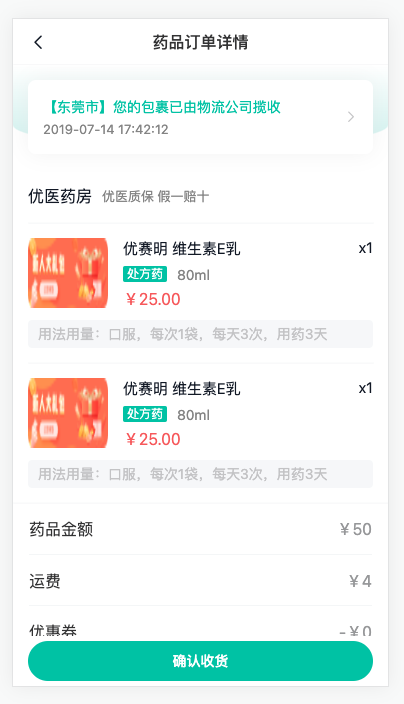
1)路由与组件
ts
    {
      path: '/order/:id',
      component: () => import('@/views/Order/OrderDetail.vue'),
      meta: { title: '药品订单详情' }
    }
1
2
3
4
5
2
3
4
5
vue
<script setup lang="ts"></script>

<template>
  <div class="order-detail-page">
    <cp-nav-bar title="药品订单详情" />
    <div class="order-head">
      <div class="card">
        <div class="logistics">
          <p>【东莞市】您的包裹已由物流公司揽收</p>
          <p>2019-07-14 17:42:12</p>
        </div>
        <van-icon name="arrow" />
      </div>
    </div>
    <div class="order-medical">
      <div class="head">
        <h3>优医药房</h3>
        <small>优医质保 假一赔十</small>
      </div>
      <div class="item van-hairline--top" v-for="i in 2" :key="i">
        <img class="img" src="@/assets/ad.png" alt="" />
        <div class="info">
          <p class="name">
            <span>优赛明 维生素E乳</span>
            <span>x1</span>
          </p>
          <p class="size">
            <van-tag>处方药</van-tag>
            <span>80ml</span>
          </p>
          <p class="price">¥25.00</p>
        </div>
        <div class="desc">用法用量:口服,每次1袋,每天3次,用药3天</div>
      </div>
    </div>
    <div class="order-detail">
      <van-cell-group>
        <van-cell title="药品金额" value="¥50" />
        <van-cell title="运费" value="¥4" />
        <van-cell title="优惠券" value="-¥0" />
        <van-cell title="实付款" value="¥54" class="price" />
        <van-cell title="订单编号" value="202201127465" />
        <van-cell title="创建时间" value="2022-01-23 09:23:46" />
        <van-cell title="支付时间" value="2022-01-23 09:23:46" />
        <van-cell title="支付方式" value="支付宝支付" />
      </van-cell-group>
    </div>
    <!-- 已取消 -->
    <!-- <van-action-bar>
      <van-action-bar-icon icon="delete-o" text="删除" />
      <van-action-bar-button type="primary" text="沟通记录" />
    </van-action-bar> -->
    <!-- 待收货 -->
    <van-action-bar>
      <van-action-bar-button type="primary" text="确认收货" />
    </van-action-bar>
    <!-- 待发货 -->
    <!-- <van-action-bar>
      <van-action-bar-button type="primary" text="提醒发货" />
    </van-action-bar> -->
    <!-- 待支付 -->
    <!-- <van-action-bar>
      <p class="price">需要支付:<span>¥60</span></p>
      <van-action-bar-button color="#bbb" text="取消问诊" />
      <van-action-bar-button type="primary" text="继续支付" />
    </van-action-bar> -->
    <!-- 已完成 -->
    <!-- <van-action-bar>
      <van-action-bar-icon icon="delete-o" text="删除" />
      <van-action-bar-button type="primary" text="再次购买" />
    </van-action-bar> -->
  </div>
</template>

<style lang="scss" scoped>
.order-detail-page {
  padding-top: 46px;
  padding-bottom: 65px;
}
.order-head {
  position: relative;
  padding: 15px;
  &::before {
    content: '';
    position: absolute;
    left: 0;
    top: 0;
    width: 100%;
    height: 80px;
    background: linear-gradient(180deg, rgba(44, 181, 165, 0), rgba(44, 181, 165, 0.2));
    border-bottom-left-radius: 150px 20px;
    border-bottom-right-radius: 150px 20px;
  }
  .card {
    height: 74px;
    background-color: #fff;
    border-radius: 8px;
    position: relative;
    display: flex;
    align-items: center;
    padding: 0 15px;
    box-shadow: 0px 0px 22px 0px rgba(229, 229, 229, 0.5);
    .logistics {
      flex: 1;
      p {
        &:first-child {
          color: var(--cp-primary);
        }
        &:last-child {
          color: var(--cp-tag);
          font-size: 13px;
          margin-top: 5px;
        }
      }
    }
    .van-icon {
      color: var(--cp-tip);
    }
  }
}
:deep(.van-cell) {
  .van-cell__title {
    font-size: 16px;
    flex: none;
    width: 100px;
  }
  .van-cell__value {
    font-size: 16px;
  }
  &.price {
    .van-cell__value {
      font-size: 18px;
      color: var(--cp-price);
    }
  }
}
.order-medical {
  background-color: #fff;
  padding: 0 15px;
  .head {
    display: flex;
    height: 54px;
    align-items: center;
    > h3 {
      font-size: 16px;
      font-weight: normal;
    }
    > small {
      font-size: 13px;
      color: var(--cp-tag);
      margin-left: 10px;
    }
  }
  .item {
    display: flex;
    flex-wrap: wrap;
    padding: 15px 0;
    .img {
      width: 80px;
      height: 70px;
      border-radius: 2px;
      overflow: hidden;
    }
    .info {
      padding-left: 15px;
      width: 250px;
      .name {
        display: flex;
        font-size: 15px;
        margin-bottom: 5px;
        > span:first-child {
          width: 200px;
        }
        > span:last-child {
          width: 50px;
          text-align: right;
        }
      }
      .size {
        margin-bottom: 5px;
        .van-tag {
          background-color: var(--cp-primary);
          vertical-align: middle;
        }
        span:not(.van-tag) {
          margin-left: 10px;
          color: var(--cp-tag);
          vertical-align: middle;
        }
      }
      .price {
        font-size: 16px;
        color: #eb5757;
      }
    }
    .desc {
      width: 100%;
      background-color: var(--cp-bg);
      border-radius: 4px;
      margin-top: 10px;
      padding: 4px 10px;
      color: var(--cp-tip);
    }
  }
}
.van-action-bar {
  padding: 0 10px;
  box-shadow: 0 0 2px rgba(0, 0, 0, 0.1);
  .price {
    padding: 0 10px;
    > span {
      font-size: 18px;
      color: var(--cp-price);
    }
  }
}
</style>
1
2
3
4
5
6
7
8
9
10
11
12
13
14
15
16
17
18
19
20
21
22
23
24
25
26
27
28
29
30
31
32
33
34
35
36
37
38
39
40
41
42
43
44
45
46
47
48
49
50
51
52
53
54
55
56
57
58
59
60
61
62
63
64
65
66
67
68
69
70
71
72
73
74
75
76
77
78
79
80
81
82
83
84
85
86
87
88
89
90
91
92
93
94
95
96
97
98
99
100
101
102
103
104
105
106
107
108
109
110
111
112
113
114
115
116
117
118
119
120
121
122
123
124
125
126
127
128
129
130
131
132
133
134
135
136
137
138
139
140
141
142
143
144
145
146
147
148
149
150
151
152
153
154
155
156
157
158
159
160
161
162
163
164
165
166
167
168
169
170
171
172
173
174
175
176
177
178
179
180
181
182
183
184
185
186
187
188
189
190
191
192
193
194
195
196
197
198
199
200
201
202
203
204
205
206
207
208
209
210
211
212
213
214
215
216
217
2
3
4
5
6
7
8
9
10
11
12
13
14
15
16
17
18
19
20
21
22
23
24
25
26
27
28
29
30
31
32
33
34
35
36
37
38
39
40
41
42
43
44
45
46
47
48
49
50
51
52
53
54
55
56
57
58
59
60
61
62
63
64
65
66
67
68
69
70
71
72
73
74
75
76
77
78
79
80
81
82
83
84
85
86
87
88
89
90
91
92
93
94
95
96
97
98
99
100
101
102
103
104
105
106
107
108
109
110
111
112
113
114
115
116
117
118
119
120
121
122
123
124
125
126
127
128
129
130
131
132
133
134
135
136
137
138
139
140
141
142
143
144
145
146
147
148
149
150
151
152
153
154
155
156
157
158
159
160
161
162
163
164
165
166
167
168
169
170
171
172
173
174
175
176
177
178
179
180
181
182
183
184
185
186
187
188
189
190
191
192
193
194
195
196
197
198
199
200
201
202
203
204
205
206
207
208
209
210
211
212
213
214
215
216
217
2)抽取药品组件
vue
<script setup lang="ts">
import type { Medical } from '@/types/room'

const { medicines = [] } = defineProps<{ medicines?: Medical[] }>()
</script>

<template>
  <div class="order-medical">
    <div class="head">
      <h3>优医药房</h3>
      <small>优医质保 假一赔十</small>
    </div>
    <div class="item van-hairline--top" v-for="med in medicines" :key="med.id">
      <img class="img" :src="med.avatar" alt="" />
      <div class="info">
        <p class="name">
          <span>{{ med.name }}</span>
          <span>x{{ med.quantity }}</span>
        </p>
        <p class="size">
          <van-tag v-if="med.prescriptionFlag === 1">处方药</van-tag>
          <span>{{ med.specs }}</span>
        </p>
        <p class="price">¥{{ med.amount }}</p>
      </div>
      <div class="desc" v-if="med.usageDosag">{{ med.usageDosag }}</div>
    </div>
  </div>
</template>

<style lang="scss" scoped>
.order-medical {
  background-color: #fff;
  padding: 0 15px;
  .head {
    display: flex;
    height: 54px;
    align-items: center;
    > h3 {
      font-size: 16px;
      font-weight: normal;
    }
    > small {
      font-size: 13px;
      color: var(--cp-tag);
      margin-left: 10px;
    }
  }
  .item {
    display: flex;
    flex-wrap: wrap;
    padding: 15px 0;
    .img {
      width: 80px;
      height: 70px;
      border-radius: 2px;
      overflow: hidden;
    }
    .info {
      padding-left: 15px;
      width: 250px;
      .name {
        display: flex;
        font-size: 15px;
        margin-bottom: 5px;
        > span:first-child {
          width: 200px;
        }
        > span:last-child {
          width: 50px;
          text-align: right;
        }
      }
      .size {
        margin-bottom: 5px;
        .van-tag {
          background-color: var(--cp-primary);
          vertical-align: middle;
        }
        span:not(.van-tag) {
          margin-left: 10px;
          color: var(--cp-tag);
          vertical-align: middle;
        }
      }
      .price {
        font-size: 16px;
        color: #eb5757;
      }
    }
    .desc {
      width: 100%;
      background-color: var(--cp-bg);
      border-radius: 4px;
      margin-top: 10px;
      padding: 4px 10px;
      color: var(--cp-tip);
    }
  }
}
</style>
1
2
3
4
5
6
7
8
9
10
11
12
13
14
15
16
17
18
19
20
21
22
23
24
25
26
27
28
29
30
31
32
33
34
35
36
37
38
39
40
41
42
43
44
45
46
47
48
49
50
51
52
53
54
55
56
57
58
59
60
61
62
63
64
65
66
67
68
69
70
71
72
73
74
75
76
77
78
79
80
81
82
83
84
85
86
87
88
89
90
91
92
93
94
95
96
97
98
99
100
101
2
3
4
5
6
7
8
9
10
11
12
13
14
15
16
17
18
19
20
21
22
23
24
25
26
27
28
29
30
31
32
33
34
35
36
37
38
39
40
41
42
43
44
45
46
47
48
49
50
51
52
53
54
55
56
57
58
59
60
61
62
63
64
65
66
67
68
69
70
71
72
73
74
75
76
77
78
79
80
81
82
83
84
85
86
87
88
89
90
91
92
93
94
95
96
97
98
99
100
101
3)获取订单详情数据hook封装
ts
import { getMedicalOrderDetail } from '@/services/order'
import type { OrderDetail } from '@/types/order'
import { onMounted, ref } from 'vue'

export const useOrderDetail = (id: string) => {
  const loading = ref(false)
  const order = ref<OrderDetail>()
  onMounted(async () => {
    loading.value = true
    try {
      const res = await getMedicalOrderDetail(id)
      order.value = res.data
    } finally {
      loading.value = false
    }
  })
  return { order, loading }
}
1
2
3
4
5
6
7
8
9
10
11
12
13
14
15
16
17
18
2
3
4
5
6
7
8
9
10
11
12
13
14
15
16
17
18
4)获取信息且渲染
vue
<script setup lang="ts">
import { useRoute } from 'vue-router'
import { useOrderDetail } from '@/composable'
import OrderMedical from './components/OrderMedical.vue'

const route = useRoute()
const { order } = useOrderDetail(route.params.id as string)
</script>

<template>
  <div class="order-detail-page" v-if="order">
    <cp-nav-bar title="药品订单详情" />
    <div class="order-head">
      <div class="card" @click="$router.push(`/order/logistics/${order?.id}`)">
        <div class="logistics">
          <p>{{ order.expressInfo?.content }}</p>
          <p>{{ order.expressInfo?.time }}</p>
        </div>
        <van-icon name="arrow" />
      </div>
    </div>
    <order-medical :medicines="order?.medicines" />
    <div class="order-detail">
      <van-cell-group>
        <van-cell title="药品金额" :value="`¥${order.payment}`" />
        <van-cell title="运费" :value="`¥${order.expressFee}`" />
        <van-cell title="优惠券" :value="`-¥${order.couponDeduction}`" />
        <van-cell title="实付款" :value="`¥${order.actualPayment}`" class="price" />
        <van-cell title="订单编号" :value="order.orderNo" />
        <van-cell title="创建时间" :value="order.createTime" />
        <van-cell title="支付时间" :value="order.payTime" />
        <van-cell title="支付方式" :value="order.paymentMethod === 0 ? '微信' : '支付宝'" />
      </van-cell-group>
    </div>
    <!-- 待收货 -->
    <van-action-bar>
      <van-action-bar-button type="primary" text="确认收货" />
    </van-action-bar>
  </div>
</template>
1
2
3
4
5
6
7
8
9
10
11
12
13
14
15
16
17
18
19
20
21
22
23
24
25
26
27
28
29
30
31
32
33
34
35
36
37
38
39
40
2
3
4
5
6
7
8
9
10
11
12
13
14
15
16
17
18
19
20
21
22
23
24
25
26
27
28
29
30
31
32
33
34
35
36
37
38
39
40
药品订单-物流详情
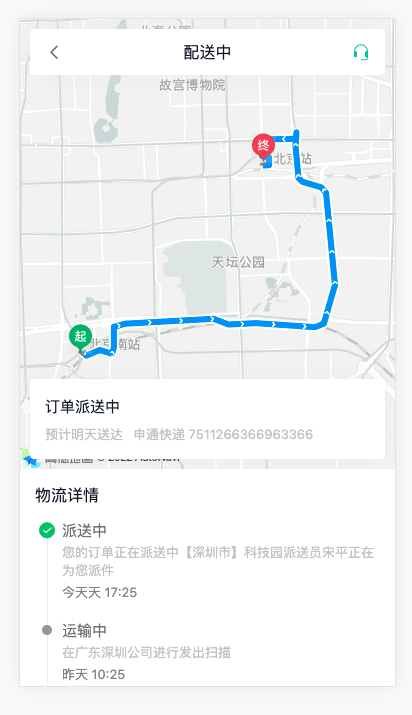
1)路由与组件
ts
    {
      path: '/order/logistics/:id',
      component: () => import('@/views/Order/OrderLogistics.vue'),
      meta: { title: '物流详情' }
    }
1
2
3
4
5
2
3
4
5
vue
<script setup lang="ts"></script>

<template>
  <div class="order-logistics-page">
    <div id="map">
      <div class="title">
        <van-icon name="arrow-left" @click="$router.back()" />
        <span>配送中</span>
        <van-icon name="service" />
      </div>
      <div class="current">
        <p class="status">订单派送中 预计明天送达</p>
        <p class="predict">
          <span>申通快递</span>
          <span>7511266366963366</span>
        </p>
      </div>
    </div>
    <div class="logistics">
      <p class="title">物流详情</p>
      <van-steps direction="vertical" :active="0">
        <van-step>
          <p class="status">派送中</p>
          <p class="content">您的订单正在派送中【深圳市】科技园派送员宋平正在为您派件</p>
          <p class="time">今天天 17:25</p>
        </van-step>
        <van-step v-for="i in 5" :key="i">
          <p class="status">运输中</p>
          <p class="content">在广东深圳公司进行发出扫描</p>
          <p class="time">昨天 10:25</p>
        </van-step>
        <van-step>
          <p class="status">已发货</p>
          <p class="content">卖家已发货</p>
          <p class="time">2022-08-20 10:25</p>
        </van-step>
      </van-steps>
    </div>
  </div>
</template>

<style lang="scss" scoped>
.order-logistics-page {
  --van-step-icon-size: 18px;
  --van-step-circle-size: 10px;
}
#map {
  height: 450px;
  background-color: var(--cp-bg);
  overflow: hidden;
  position: relative;
  .title {
    background-color: #fff;
    height: 46px;
    width: 355px;
    border-radius: 4px;
    display: flex;
    align-items: center;
    padding: 0 15px;
    font-size: 16px;
    position: absolute;
    left: 10px;
    top: 10px;
    box-sizing: border-box;
    box-shadow: 0px 0px 22px 0px rgba(229, 229, 229, 0.5);
    z-index: 999;
    > span {
      flex: 1;
      text-align: center;
    }
    .van-icon {
      font-size: 18px;
      color: #666;
      &:last-child {
        color: var(--cp-primary);
      }
    }
  }
  .current {
    height: 80px;
    border-radius: 4px;
    background-color: #fff;
    height: 80px;
    width: 355px;
    box-sizing: border-box;
    padding: 15px;
    position: absolute;
    left: 10px;
    bottom: 10px;
    box-shadow: 0px 0px 22px 0px rgba(229, 229, 229, 0.5);
    z-index: 999;
    .status {
      font-size: 15px;
      line-height: 26px;
    }
    .predict {
      color: var(--cp-tip);
      font-size: 13px;
      margin-top: 5px;
      > span {
        padding-right: 10px;
      }
    }
  }
}
.logistics {
  padding: 0 10px 20px;
  .title {
    font-size: 16px;
    padding: 15px 5px 5px;
  }
  .van-steps {
    :deep(.van-step) {
      &::after {
        display: none;
      }
    }
    .status {
      font-size: 15px;
      color: var(--cp-text3);
      margin-bottom: 4px;
    }
    .content {
      font-size: 13px;
      color: var(--cp-tip);
      margin-bottom: 4px;
    }
    .time {
      font-size: 13px;
      color: var(--cp-tag);
    }
  }
}
</style>
1
2
3
4
5
6
7
8
9
10
11
12
13
14
15
16
17
18
19
20
21
22
23
24
25
26
27
28
29
30
31
32
33
34
35
36
37
38
39
40
41
42
43
44
45
46
47
48
49
50
51
52
53
54
55
56
57
58
59
60
61
62
63
64
65
66
67
68
69
70
71
72
73
74
75
76
77
78
79
80
81
82
83
84
85
86
87
88
89
90
91
92
93
94
95
96
97
98
99
100
101
102
103
104
105
106
107
108
109
110
111
112
113
114
115
116
117
118
119
120
121
122
123
124
125
126
127
128
129
130
131
132
133
134
2
3
4
5
6
7
8
9
10
11
12
13
14
15
16
17
18
19
20
21
22
23
24
25
26
27
28
29
30
31
32
33
34
35
36
37
38
39
40
41
42
43
44
45
46
47
48
49
50
51
52
53
54
55
56
57
58
59
60
61
62
63
64
65
66
67
68
69
70
71
72
73
74
75
76
77
78
79
80
81
82
83
84
85
86
87
88
89
90
91
92
93
94
95
96
97
98
99
100
101
102
103
104
105
106
107
108
109
110
111
112
113
114
115
116
117
118
119
120
121
122
123
124
125
126
127
128
129
130
131
132
133
134
2)相关类型声明
enums/index.ts
ts
export enum ExpressStatus {
  // 已发货
  Delivered = 1,
  // 已揽件
  Received = 2,
  // 运输中
  Transit = 3,
  // 派送中
  Delivery = 4,
  // 已签收
  Signed = 5
}
1
2
3
4
5
6
7
8
9
10
11
12
2
3
4
5
6
7
8
9
10
11
12
types/order.d.ts
ts
export type Express = {
  // 物流信息ID
  id: string
  // 物流内容
  content: string
  // 创建时间
  createTime: string
  // 物流状态
  status: ExpressStatus
  // 状态文章
  statusValue: string
}

export type Location = {
  // 经度
  longitude: string
  // 纬度
  latitude: string
}

export type Logistics = {
  // 预计送达时间
  estimatedTime: string
  // 物流公司名称
  name: string
  // 物流编号
  awbNo: string
  // 最新物流状态
  status: ExpressStatus
  // 最新物流状态文字
  statusValue: string
  // 物流信息数组
  list: Express[]
  // 轨迹信息数组
  logisticsInfo: Location[]
  // 当前运输位置
  currentLocationInfo: Location
}
1
2
3
4
5
6
7
8
9
10
11
12
13
14
15
16
17
18
19
20
21
22
23
24
25
26
27
28
29
30
31
32
33
34
35
36
37
38
2
3
4
5
6
7
8
9
10
11
12
13
14
15
16
17
18
19
20
21
22
23
24
25
26
27
28
29
30
31
32
33
34
35
36
37
38
3)获取物流详情API函数 services/order.ts
ts
// 获取药品订单物流信息
export const getMedicalOrderLogistics = (id: string) =>
  request<Logistics>(`/patient/order/${id}/logistics`)
1
2
3
2
3
4)获取数据且渲染
vue
<script setup lang="ts">
import { getMedicalOrderLogistics } from '@/services/order'
import type { Logistics } from '@/types/order'
import { onMounted, ref } from 'vue'
import { useRoute } from 'vue-router'

// 获取物流信息
const logistics = ref<Logistics>()
const route = useRoute()
onMounted(async () => {
  const res = await getMedicalOrderLogistics(route.params.id as string)
  logistics.value = res.data
})
</script>

<template>
  <div class="order-logistics-page">
    <div id="map">
      <div class="title">
        <van-icon name="arrow-left" @click="$router.back()" />
        <span>{{ logistics?.statusValue }}</span>
        <van-icon name="service" />
      </div>
      <div class="current">
        <p class="status">{{ logistics?.statusValue }} 预计{{ logistics?.estimatedTime }}送达</p>
        <p class="predict">
          <span>{{ logistics?.name }}</span>
          <span>{{ logistics?.awbNo }}</span>
        </p>
      </div>
    </div>
    <div class="logistics">
      <p class="title">物流详情</p>
      <van-steps direction="vertical" :active="0">
        <van-step v-for="item in logistics?.list" :key="item.id">
          <p class="status" v-if="item.statusValue">{{ item.statusValue }}</p>
          <p class="content">{{ item.content }}</p>
          <p class="time">{{ item.createTime }}</p>
        </van-step>
      </van-steps>
    </div>
  </div>
</template>
1
2
3
4
5
6
7
8
9
10
11
12
13
14
15
16
17
18
19
20
21
22
23
24
25
26
27
28
29
30
31
32
33
34
35
36
37
38
39
40
41
42
43
2
3
4
5
6
7
8
9
10
11
12
13
14
15
16
17
18
19
20
21
22
23
24
25
26
27
28
29
30
31
32
33
34
35
36
37
38
39
40
41
42
43
药品订单-高德地图-初始化
参考文档
步骤:
- 准备工作 https://lbs.amap.com/api/jsapi-v2/guide/abc/prepare
- Vue中使用 https://lbs.amap.com/api/jsapi-v2/guide/webcli/map-vue1
代码:
注册&认证完毕===>创建web应用====>得到
key和jscodekey4eed3d61125c8b9c168fc22414aaef7ejscode415e917da833efcf2d5b69f4d821784b
在vue3中使用
a. 安装
bash
pnpm add @amap/amap-jsapi-loader
1
b. 配置 securityJsCode
ts
window._AMapSecurityConfig = {
  securityJsCode: '415e917da833efcf2d5b69f4d821784b'
}
1
2
3
2
3
c. 扩展 Window 的类型 types/global.d.ts
ts
interface Window {
  _AMapSecurityConfig: {
    securityJsCode: string
  }
}
1
2
3
4
5
2
3
4
5
d. 加载高德地图需要的资源,组件初始化的时候
ts
import AMapLoader from '@amap/amap-jsapi-loader'
1
ts
onMounted(async () => {
  // ... 省略 ...
  AMapLoader.load({
    key: '4eed3d61125c8b9c168fc22414aaef7e',
    version: '2.0'
  }).then((AMap) => {
    // 使用 Amap 初始化地图
  })
})
1
2
3
4
5
6
7
8
9
2
3
4
5
6
7
8
9
ts
const map = new AMap.Map('map', {
  mapStyle: 'amap://styles/whitesmoke',
  zoom: 12
})
1
2
3
4
2
3
4
药品订单-高德地图-物流轨迹
步骤:
- 绘制轨迹
- 关闭默认覆盖物
- 绘制位置
代码:
1)绘制路径 map 绘制到哪个地图上,showTraffic 是否先道路情况 参考示例
ts
AMap.plugin('AMap.Driving', function () {
  const driving = new AMap.Driving({
    map: map,
    showTraffic: false,
  })

  // 起点
  const start = res.data.logisticsInfo.shift()
  // 终点
  const end = res.data.logisticsInfo.pop()

  driving.search(
    [start?.longitude, start?.latitude],
    [end?.longitude, end?.latitude],
    { waypoints: res.data.logisticsInfo.map((item) => [item.longitude, item.latitude]) },
    (status: string, result: object) => {
      // 未出错时,result即是对应的路线规划方案
      console.log(status, result)
    }
  )
})
1
2
3
4
5
6
7
8
9
10
11
12
13
14
15
16
17
18
19
20
21
2
3
4
5
6
7
8
9
10
11
12
13
14
15
16
17
18
19
20
21
2)关闭 marker 标记,自定义 marker 标记 参考文档
diff
  const driving = new AMap.Driving({
    map: map,
    showTraffic: false,
+    hideMarkers: true
  })
1
2
3
4
5
2
3
4
5
ts
import endImg from '@/assets/end.png'
import startImg from '@/assets/start.png'
1
2
2
ts
      // 终点
      const end = res.data.logisticsInfo.pop()
      const endMarker = new AMap.Marker({
        position: [end?.longitude, end?.latitude],
        icon: endImg
      })
      map.add(endMarker)
      // 起点
      const start = res.data.logisticsInfo.shift()
      const startMarker = new AMap.Marker({
        position: [start?.longitude, start?.latitude],
        icon: startImg
      })
      map.add(startMarker)
1
2
3
4
5
6
7
8
9
10
11
12
13
14
2
3
4
5
6
7
8
9
10
11
12
13
14
3)标记当前货运位置
ts
import carImg from '@/assets/car.png'
1
diff
driving.search(
  [start?.longitude, start?.latitude],
  [end?.longitude, end?.latitude],
  { waypoints: res.data.logisticsInfo.map((item) => [item.longitude, item.latitude]) },
  (status: string, result: object) => {
    // 未出错时,result即是对应的路线规划方案
    console.log(status, result)
+    const marker = new AMap.Marker({
+      icon: carImg,
+      position: [
+        res.data.currentLocationInfo.longitude,
+        res.data.currentLocationInfo.latitude
+      ],
+      anchor: 'center'
+    })
+    map.add(marker)
+    setTimeout(() => {
+      map.setFitView([marker])
+      map.setZoom(10)
+    }, 3000)
+  }
)
1
2
3
4
5
6
7
8
9
10
11
12
13
14
15
16
17
18
19
20
21
22
2
3
4
5
6
7
8
9
10
11
12
13
14
15
16
17
18
19
20
21
22